Painel do Usuário
Seu perfil é o ponto de partida para personalizar a forma como você interage com o ENSPACE.
Nele, você pode ajustar dados pessoais, idioma, visual da interface e configurações de segurança, tudo de forma simples e objetiva.
O que você encontra na tela
Na área de configuração de Perfil, você encontrará as seguintes abas:
- Perfil: onde você pode editar suas informações gerais e preferências de conta.
- Cobrança (em breve): onde você poderá consultar detalhes da sua assinatura do ENSPACE.
- Integrações: onde você pode fazer a gestão das integrações da sua conta com serviços externos.
- Dev: onde você pode gerar tokens de acesso pessoal para autenticar chamadas na nossa API.
- Lab: onde você pode experimentar, em primeira mão, novas funcionalidades que ainda estão em fase de teste.
- Segurança: onde você pode gerenciar suas credenciais e reforçar a proteção da sua conta.
Em resumo, cada aba do seu Painel do Usuário centraliza um aspecto da sua experiência no ENSPACE: desde dados pessoais até segurança e integrações avançadas.
Perfil
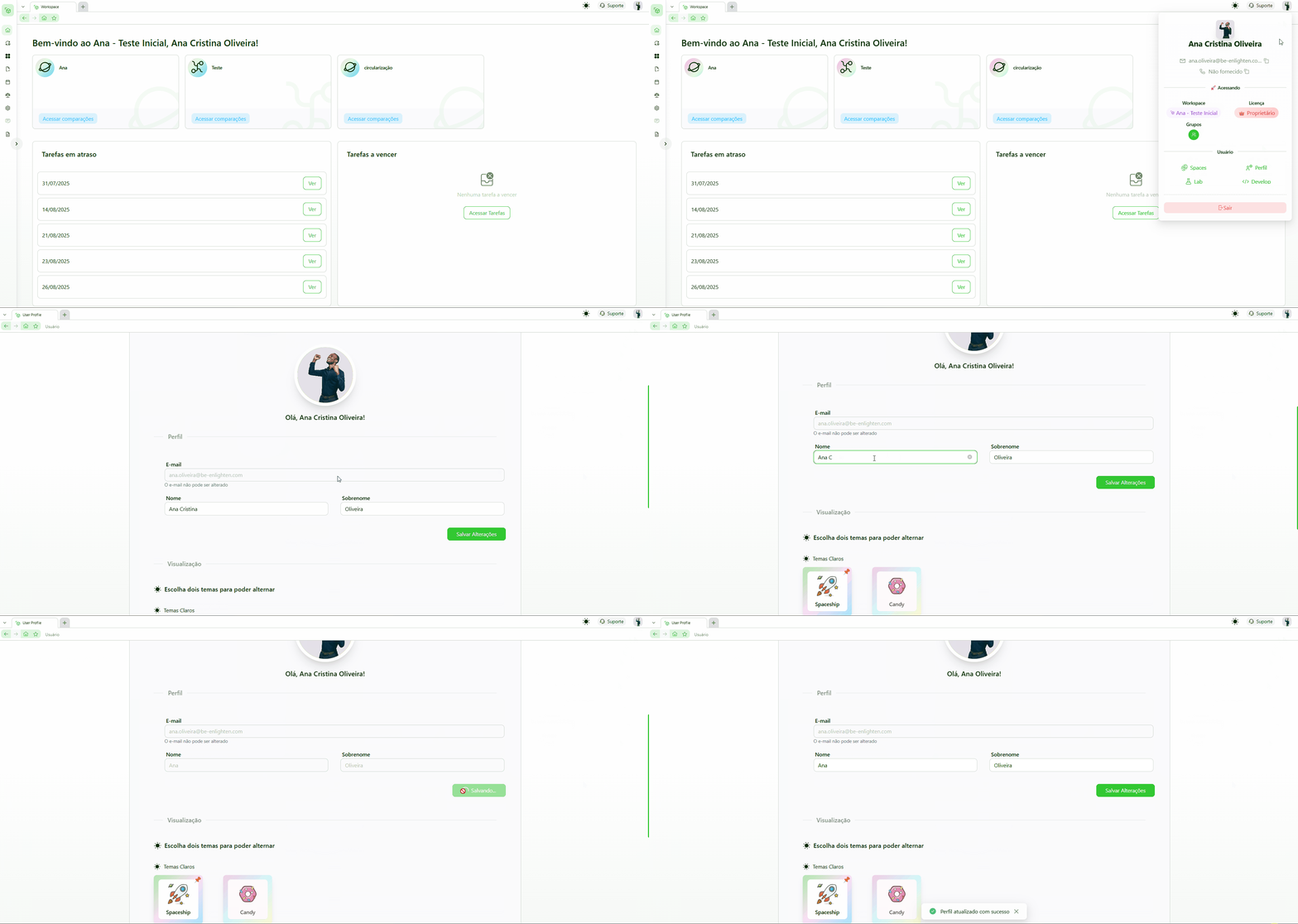
Na aba Perfil do seu Painel do Usuário, você pode acessar e editar suas informações pessoais e preferências de conta.
Nela, você encontrará campos como:
- Foto de perfil → imagem que identificará seu perfil de usuário.
- Nome e sobrenome → como você será identificado em fluxos e registros da plataforma.
- Idioma → define o idioma padrão de navegação no ENSPACE.
- Preferências Visuais → você pode escolher até dois temas estéticos para o seu uso pessoal.
Como acessar e editar suas informações de perfil
- Clique no seu avatar, no canto superior direito da tela
(pode ser sua foto de perfil, se já foi definida, ou as iniciais do seu nome e sobrenome). - Selecione “Perfil” no menu.
- Edite as informações desejadas.
- Clique em “Salvar” para aplicar as alterações.
Dicas úteis
- Mantenha seus dados sempre atualizados para melhorar a rastreabilidade em fluxos e processos.
- Personalize sua interface com temas e idioma para tornar seu uso mais confortável.
- Em contas com SSO, alterações de segurança devem ser feitas fora do ENSPACE.
Teve algum problema?
Se estiver com dificuldades para acessar ou editar seu perfil, entre em contato com o nosso suporte: