Start Node
Start Node — The starting point of every flow
Every flow created in Spaceflow begins with a start node. It is responsible for defining how and when the flow will be activated.
Start Node Settings
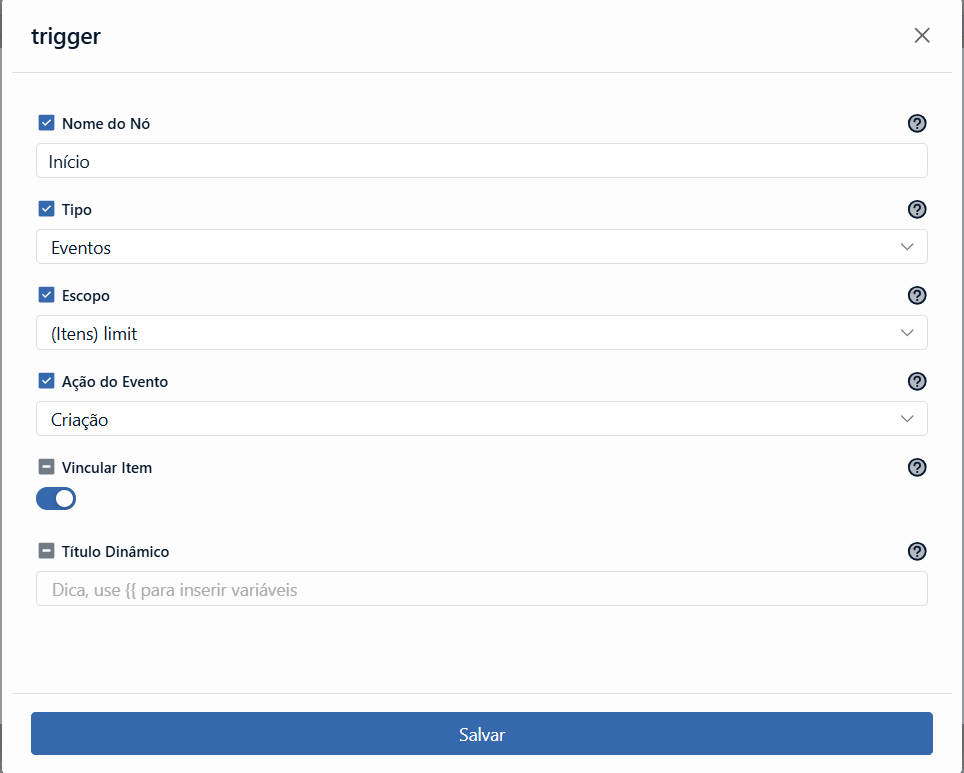
Node Name
- Starts with "start" as the default, but can be customized.
Trigger Type
Choose how the flow will be started:
- Manual: The flow is started manually via the "Start" button on the flow panel.
- Events: Monitors specific actions, such as a form submission or the completion of a step.
- Webhook: Allows triggering the flow via an external HTTP request.
- Timer: Starts the flow on a recurring schedule, with no user interaction. See Timer Settings below.
Scope
Select the category (such as "Contracts", "Requests", etc.) that will serve as the trigger for starting the flow. (Based on the categories created in your workspace.)
Event Action
Define which change to the item should trigger the flow:
- Creation
- Update
- Deletion
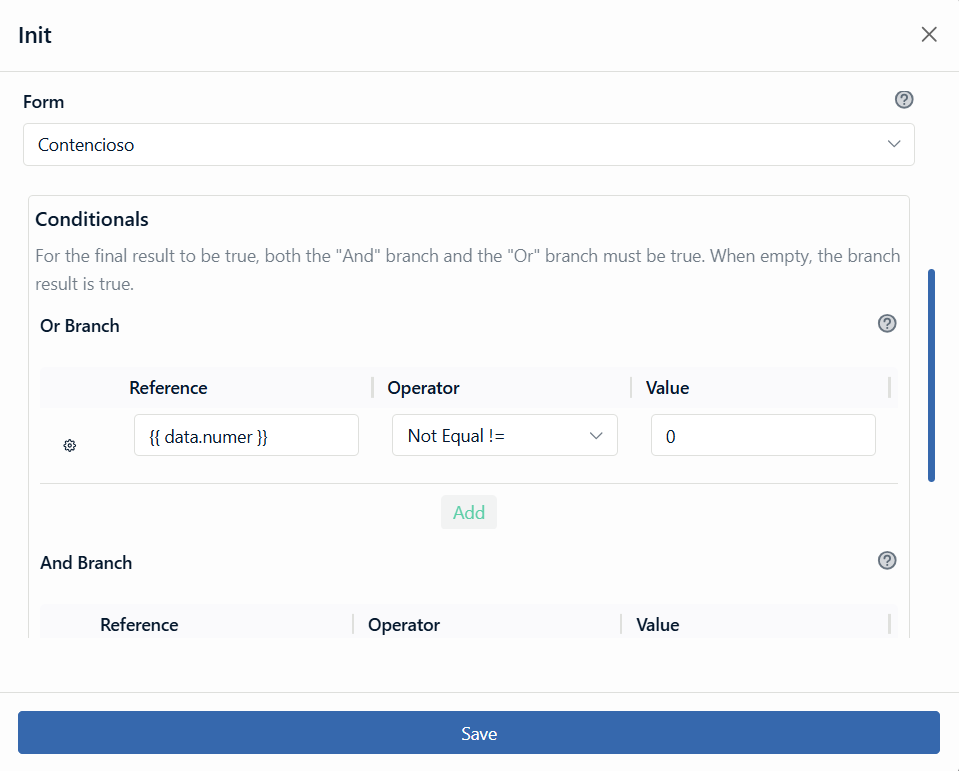
Form (for Creation action)
When the selected action is Creation, you can define which form will be used as the event source. This allows the flow to be triggered only when an item is created from a specific form, providing greater control over the flow's initial behavior.
Event Conditionals
You can add conditions to determine whether the flow should start based on specific fields or values.
Link Item
Activate to connect the flow directly to the source item. This allows tracking and querying this relationship within the item's card.
Dynamic Title
Customize the flow title based on dynamic fields.
Webhook Settings
When the trigger type is Webhook, the flow waits for an HTTP request coming from outside ENSPACE — an ERP, a website, a payment gateway or even another Spaceflow.
Once the flow is saved with the Webhook trigger, its row on the Spaceflow Settings screen shows webhook in the Trigger column, with an information icon next to it. That icon opens the Webhook integration panel, which gathers everything the external system needs:
- Public endpoint — the address that receives the call, in the format
https://<ENSPACE api>/ws/<workspace slug>/<identifier>. The workspace slug is part of the route, so the workspace is resolved from the URL itself rather than from a header. The identifier is a long sequence generated by ENSPACE, unique to that flow. - Token — the secret that authorizes the call. It appears masked in the panel and is copied with the button next to it.
- Header — the name of the header that carries the token:
x-en-workflows-webhook-token.
Send a POST to the endpoint and include the header with the token on every request. Each successful request runs the flow once.
curl -X POST "https://<ENSPACE api>/ws/<workspace slug>/<identifier>" \
  -H "x-en-workflows-webhook-token: <token>" \
  -H "Content-Type: application/json" \
  -d '{"hello":"world"}'
Timer Settings
When the trigger type is Timer, the flow runs on a schedule instead of reacting to an item or a request. The settings that appear depend on the periodicity you choose.
Execution Periodicity
| Option | Runs |
|---|---|
| Hour | Every hour |
| Day | Once a day, at the chosen hour |
| Week | Once a week |
| Month | Once a month, on the chosen day |
| Year | Once a year |
Which day of the month
Shown for the Month periodicity. Selects the day the flow runs.
Pick a day that exists in every month. A flow set to day 31 will not have a matching day in February, April, June, September, or November.
Which hour of the day
Shown from Day downwards. Selects the hour (0–23) the flow runs.
Execution time zone
The time zone the schedule is evaluated in — for example America/Sao_Paulo. Set this deliberately: the same "8" means different moments in different zones, and a daily report that lands at 5 a.m. is a time zone that was never chosen.
Exact time match
When enabled, the flow runs only at the exact configured moment. When disabled, the scheduler may run it within a short window around that time.
Notes for API use
The Start Node is also configurable through the API, and two details differ from what this screen shows:
- The trigger type displayed as Timer is stored as
cron— both indata.typeand in thetrigger_refprefix (cron::<node id>::create). Sendingtimerreturns400 ERGTR02. - The schedule lives in
data.cron_config, withperiodicity,day_specificity(a number),hour_specificity(a string),timezoneandexact_time.