Standalone Calculator
Simulate adjustments without creating items
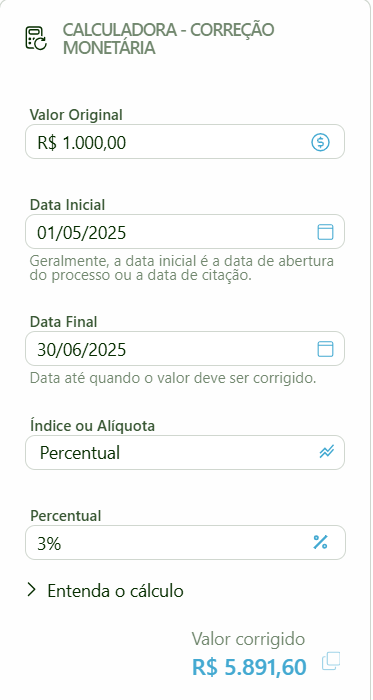
The Standalone Calculator allows you to adjust monetary values based on official economic indices or a fixed percentage, without configuring fields or creating items in the workspace. It is useful for quick simulations, value verifications, or one-off calculations.
The standalone calculator is only available if the Monetary Adjustment module is activated in Settings > System > Basic Information.
How to use
Enter the Original Value
Enter the amount to be adjusted.
Enter the Start Date
The date from which the adjustment will be calculated (e.g., contract date, citation date).
Enter the End Date
The date until which the value will be adjusted.
Select the Index or Rate
Choose an official economic index (IPCA, INPC, SELIC, etc.) or select Percentage to apply a fixed rate. If you choose Percentage, an additional field will be displayed to enter the desired percentage.
Click Calculate
The result will be displayed immediately.
Result
After the calculation, the calculator displays:
- Adjusted Value — the final result of the monetary adjustment.
- "Understand the calculation" button — shows the step-by-step breakdown of the adjustment, including monthly coefficients, periods, and the formula applied.
The standalone calculator is a simulation tool only. Results are not saved in the workspace — to record adjusted values, use fields with monetary adjustment configured in your category items.